Nessuna generazione recente.
- archivo
-
Diseños
-
-
Todas las categorías -
Category #1 - Nueva Categoría
-
Mis diseños
-
-
Ayuda
-
Quick help
- ctrl+a
Select all objects
ctrl+d Double the activate object
ctrl+e Clear all objects
ctrl+s Save current stage to my design
ctrl+o Open a file to import design
ctrl+p Print
ctrl++ Zoom out
ctrl+- Zoom in
ctrl+0 Reset zoom
ctrl+z Undo changes
ctrl+shift+z Redo changes
ctrl+shift+s Download current design
delete Delete the activate object
← Move the activate object to left
↑ Move the activate object to top
→ Move the activate object to right
↓ Move the activate object to bottom
shift+← Move the activate object to left 10px
shift+↑ Move the activate object to top 10px
shift+→ Move the activate object to right 10px
shift+↓ Move the activate object to bottom 10px
-
- Guardar producto >>
- Home
- Deshacer
- Rehacer
- << Volver Sitio web
-

-
 English
-
 Italian
-
 German
-
 French
-
Spanish
Idiomas
-
- Precio base
- 0.0
- Diseño
- Producto
- Imágenes
- Texto
- AINEW
- Formas
- Capas
- Plantillas
- Cliparts
Warning! If the image you uploaded comes from our template file you will still need to enlarge it to cover the whole printable area.
Para evitar resultados de mala calidad, envíe archivos PNG o JPEG con al menos 150 DPI (tamaño máximo recomendado: 50 MB)
.
Haga clic o suelte imágenes aquí
Haga clic o arrastre para agregar texto



AI Generator
Per sfruttare l'AI devi loggarti. Se non sei registrato, registrati prima.
--
Descrivi il tuo design
Idee:
Stile
Opzioni avanzate
Le tue ultime generazioni
-
Comienza a diseñar agregando objetos desde el lado izquierdo
- Todos los objetos seleccionados están agrupados. | ¿Desagrupar?
- Agrupar objetos Agrupa la posición de los objetos seleccionados
-
-
Rellenar opciones
Guarda este color
-
-
Opciones
-
Alinear automáticamente la posición del objeto activo con otros objetos -
ENCENDIDO: mantenga todos los objetos actuales y agregue la plantilla en
APAGADO: borre todos los objetos antes de instalar la plantilla -
Reemplace el objeto de imagen seleccionado en lugar de crear uno nuevo
-
- Reemplazar imagen
- Cultivo
-
Máscara
-
Seleccionar capa de máscara
-
-
Eliminar fondo
-
Eliminar fondo
-
Profundo:
-
modo:
-
-
Filtros
-
Filtros
-
- Original
- B&W
- Satya
- Doris
- Sanna
- Vintage
- Gordon
- Carl
- Shaan
- Tonny
- Peter
- Greg
- Josh
- Karen
- Melissa
- Salomon
- Sophia
- Adrian
- Roxy
- Singe
- Borg
- Ventura
- Andy
- Vivid
- Purple
- Thresh
- Aqua
- Edge wood
- Aladin
- Amber
- Anne
- Doug
- Earl
- Kevin
- Polak
- Stan
-
Brillo:
-
Saturación:
-
Contraste:
-
- Borrar filtros
- Haga clic y luego arrastre el mouse para comenzar a dibujar . Ctrl+Z = undo, Ctrl+Shift+Z = redo
- QRCode texto
-
Rellenar opciones
-
Rellenar opciones
Guarda este color
-
Transparente:
-
Ancho de trazo:
-
Color del trazo:
-
- Desagrupar posición
-
Organizar capas
-
Posición
-
posición del objeto
Bloquear posición de objeto:
-
Centro vertical
-
Arriba a la izquierda
-
centro superior
-
arriba a la derecha
-
Centro horizontal
-
Medio izquierdo
-
centro medio
-
medio derecho
- Presione ← ↑ → ↓ para mover 1 px, y presione simultáneamente la tecla MAYÚS para mover 10px
-
Abajo a la izquierda
-
Centro inferior
-
Abajo a la derecha
-
-
Transforms
-
Rotar:
-
Sesgar X:
-
Sesgar Y:
-
Flip X:
Flip Y:
Transformación libre presionando MAYÚS ⤡
-
-
Familia de fuentes
-
Editar texto
-
Editar texto
-
-
Tamaño de letra:
-
espacio entre letras
-
altura de línea
-
-
Efectos de texto
-
Efectos de texto
-
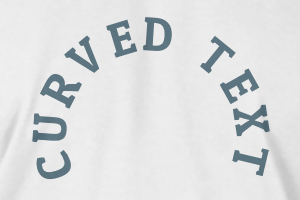
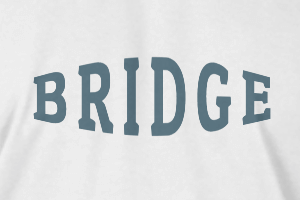
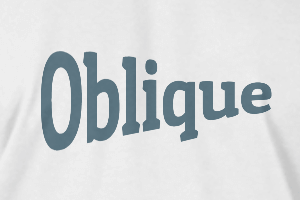
-
Radio
-
espaciado
-
Curva
-
Altura
-
Offset
-
Trident
-
-
alinear texto
- Mayúsculas / minúsculas
- Peso de fuente negrita
- estilo de texto en cursiva
- texto subrayado
Desplácese para ampliar