
What is a print on demand MCP server?
A print on demand MCP server lets an AI assistant such as Claude or ChatGPT work directly on your print-on-demand account: it can browse products and base costs, create campaigns with your designs, quote orders and follow shipments, all from the chat. Hoplix offers an official one at https://api.hoplix.com/mcp, free for every seller.
This guide explains what MCP is, what you can do with it and how to connect it in two minutes.
| 14tools for your assistant | 150+printable products | €0to connect |
What is MCP (Model Context Protocol)?
The Model Context Protocol is an open standard that lets AI assistants use external tools in a safe, controlled way. An MCP server exposes a set of tools (for example “list products” or “create order”); the assistant decides when to call them, shows you what it is doing and asks for confirmation before changing anything.
Claude, ChatGPT, Cursor, VS Code and many other apps support MCP. You connect a server once, sign in, and from then on you can ask in plain English instead of clicking through dashboards.
Why print on demand needs an MCP server
Running a print-on-demand store means jumping between the catalogue, the design editor, price lists, shipping tables and the orders page. Most of these tasks are questions: which hoodies can I print on? how much does shipping to Germany cost? where is order 1042? An MCP server turns each of them into one sentence.
|
|
||||
|
|
If you are still choosing what to sell, read our guide on how to start a print on demand business with AI and ChatGPT: the MCP server is the next step, when you want the assistant to act on your store and not only give ideas.
What you can do with the Hoplix MCP server
The Hoplix MCP integration gives the assistant 14 tools, grouped in five areas:
|
|
||||
|
|
||||
|
|
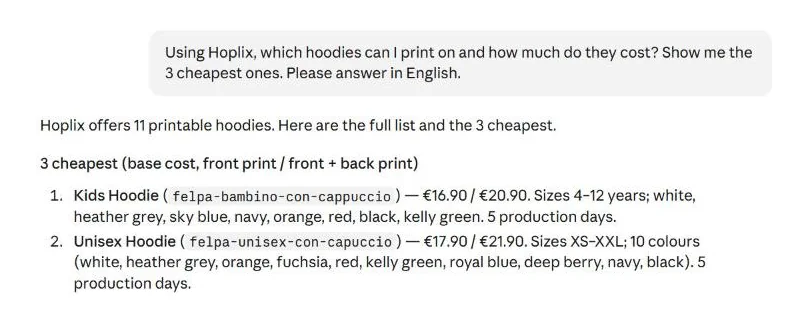
Here is a real conversation in Claude: one question returns the printable hoodies with their base costs, sizes and colours.
How to connect Hoplix to Claude
You need a free Hoplix seller account and a Claude plan that supports connectors.
- Open the Hoplix Print on Demand page in the Claude Connectors Directory and click Connect. Alternatively go to Settings → Connectors → Add custom connector and paste
https://api.hoplix.com/mcp. - Sign in with your Hoplix account and press Allow. Access uses OAuth and you can revoke it at any time.
- Start a new chat and ask your first question, for example “Which t-shirts can I print on with Hoplix?”
Developers can add it to Claude Code with one command: claude mcp add --transport http hoplix https://api.hoplix.com/mcp.
How to connect Hoplix to ChatGPT
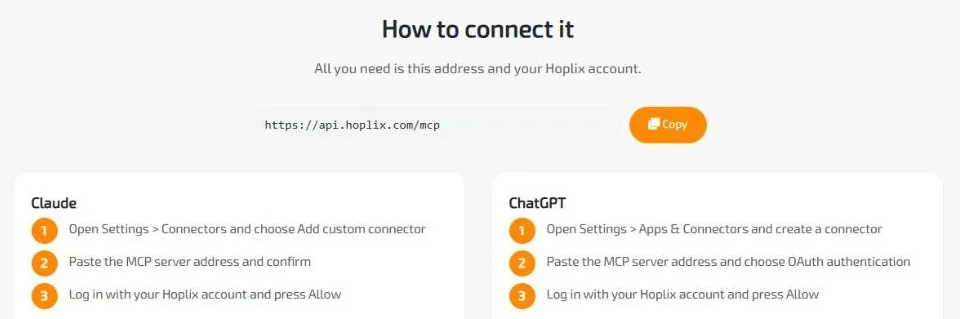
- In ChatGPT open Settings → Apps & Connectors and create a connector.
- Paste
https://api.hoplix.com/mcpand choose OAuth authentication. - Sign in with your Hoplix account and press Allow.
Cursor, VS Code, Windsurf and any other MCP client work the same way: add an HTTP server with the same address and the client opens the Hoplix sign-in page the first time.
Example prompts to try
- “Which hoodies can I print on and how much do they cost printed front and back?”
- “Create a private campaign with my logo on a black unisex t-shirt and price it at €24.”
- “How much does it cost to ship 3 t-shirts from campaign 00612345 to Germany by express courier?”
- “Place a test order of 2 pieces in size L to Berlin.”
- “Where is the order with reference SHOP-1042? Give me the tracking link.”
- “Cancel order 12345678 if it is not in production yet.”
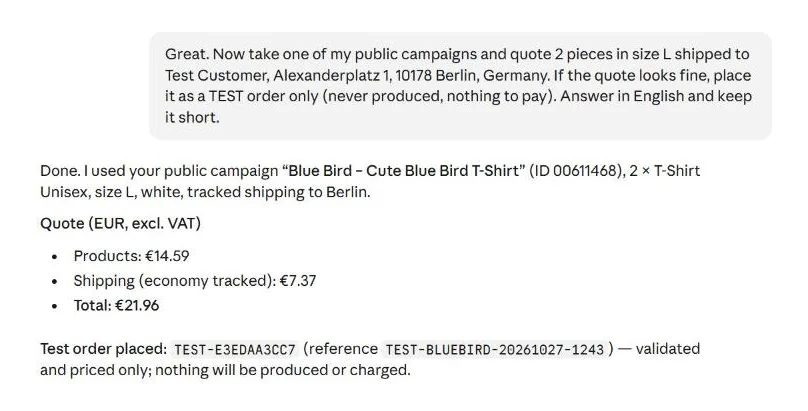
This is what a quote followed by a test order looks like: the assistant picks a campaign, calculates products and shipping, then creates an order that is validated and priced but never produced.
Official vs unofficial print on demand MCP servers
If you search for “Printify MCP” or “Printful MCP” you will mostly find community projects on GitHub. They can be useful, but they work differently from an official server:
| Hoplix MCP server | Typical community MCP server | |
|---|---|---|
| Made by | Hoplix, the print provider | Independent developers |
| Where it runs | Remote (https://api.hoplix.com/mcp), nothing to install |
Usually on your computer (Node or Python) |
| Sign-in | OAuth: you sign in on hoplix.com | API key pasted in a configuration file |
| Listed in | Claude Connectors Directory, official MCP Registry | GitHub and community directories |
| Updates | Follow the Hoplix API automatically | Depend on the maintainer |
Whatever you choose, check who runs the server and which permissions it asks for before connecting it to a store with real customers.
Security: payments stay in your hands
- Nothing is charged from the chat. Orders are created unpaid and go into production only after you pay them from the Orders page of your Hoplix account.
- Confirmation first: the assistant asks before creating campaigns or orders.
- Test mode: test orders are never produced, so you can try every flow risk-free.
- Revocable access: disconnect at any time from Account → Integrations → MCP Integration.
The full details are in the privacy policy of the MCP integration.
MCP, API or integrations: which one do you need?
- MCP server: you want to manage products, quotes and orders by talking to an AI assistant.
- Print on demand API: you are a developer and want orders to flow automatically from your own software.
- Store integrations: you sell on Shopify, WooCommerce, Etsy or Amazon and want orders to reach Hoplix by themselves.
They work together: many sellers get orders through a store integration and use the MCP server for quotes, checks and customer service.
FAQ
Is the Hoplix MCP server free?
Yes. The connection is free and so is the Hoplix seller account: you only pay the product base cost and shipping when an order is placed.
Do I need to know how to code?
No. In Claude and ChatGPT you add the connector from the settings and sign in. Only Claude Code and editors like Cursor use a command or a short configuration file.
Can the AI place real orders?
It can create real orders after asking for your confirmation, but they stay unpaid: nothing is produced or shipped until you pay them from your Hoplix account. For tests, ask for a test order.
Which AI assistants are supported?
Any client that supports remote MCP servers with OAuth: Claude (web, desktop, mobile and Claude Code), ChatGPT in developer mode, Cursor, VS Code and Windsurf.
Does it work with my Shopify or WooCommerce store?
Yes. The MCP server works on your Hoplix account, so it sees the same products, campaigns and orders that arrive from your connected stores.
In short
- server address: https://api.hoplix.com/mcp;
- works with Claude, ChatGPT (developer mode), Cursor, VS Code and Windsurf;
- 14 tools: catalogue, campaigns, quotes, orders and tracking;
- OAuth sign-in, nothing charged from the chat;
- test orders to try everything risk-free;
- documentation also on GitHub.